
Modernizing an application does not always require rebuilding it from the ground up. In many cases, the existing backend still handles business logic, data, authentication, integrations, or critical workflows reliably. The real limitation is the frontend: it may be difficult to maintain, slow to evolve, tied to an outdated framework, or unable to support the user experience the business now needs.
In that situation, a practical modernization strategy is to introduce a modern frontend while retaining the parts of the backend that still work.
The challenge is integration.
A React, Angular, Vue, or another modern frontend may expect clean APIs, predictable JSON responses, modern authentication, independent deployment, and fast data access. An older backend may expose SOAP services, server-rendered pages, tightly coupled business logic, inconsistent data structures, or APIs that were never designed for modern client applications.
The goal is therefore not simply to connect frontend and backend. It is to create a stable boundary between them so that the frontend can evolve without forcing an unnecessary backend rewrite.
This guide explains how to assess an existing backend, choose an integration architecture, define API contracts, handle security and data transformation, test the connection, and migrate incrementally with less disruption.
What Is Frontend and Backend Integration?
Frontend-backend integration is the communication layer between the user-facing application and the systems responsible for data, business rules, authentication, storage, and other server-side operations.
A typical interaction looks like this:
User action → Frontend → API or integration layer → Backend → Database/services → Response → Frontend
For example, when a customer opens an order history page:
- The frontend requests the customer’s orders.
- An API receives the request.
- The backend validates authorization.
- Business logic retrieves the appropriate records.
- The backend returns structured data.
- The frontend transforms that data into the interface the customer sees.
In a modern application, the frontend ideally does not need to understand the backend’s internal architecture. It needs a stable interface through which it can request operations and data.
That separation becomes particularly important when a modern frontend is being introduced over an existing system.
Do You Need to Replace the Existing Backend?
Not necessarily. One of the most important decisions in frontend modernization is determining whether the backend actually needs to be replaced.
A backend may be old without being obsolete. If it reliably handles business rules, transactions, databases, integrations, and core workflows, rebuilding all of that logic can introduce more cost and risk than value.
Keep the Existing Backend When
Retaining the backend can make sense when:
- core business logic remains reliable;
- the database and data model still meet operational requirements;
- security problems can be addressed without complete replacement;
- existing services can be exposed through APIs or an integration layer;
- performance is adequate or can be improved incrementally;
- external systems depend on existing backend behavior;
- rewriting mature business logic would create unnecessary migration risk.
In these situations, frontend modernization can be treated as a separate initiative rather than a full application rewrite.
Modify or Modernize the Backend When
Some backend changes may still be necessary when:
- there is no safe interface for frontend communication;
- the system depends on obsolete or unsupported technologies;
- security vulnerabilities cannot be adequately mitigated;
- business logic is tightly embedded in server-rendered UI code;
- response times cannot support the new experience;
- data structures cannot reasonably serve modern clients;
- existing interfaces cannot support required authentication or authorization;
- integrations are too brittle to expose safely.
The answer does not have to be either keep everything or rewrite everything. A hybrid architecture can preserve stable capabilities while gradually modernizing problematic components.
Assess the Existing Backend Before Designing the Frontend Integration
A successful integration starts with understanding what already exists.
Before selecting React, Angular, GraphQL, an API gateway, or any other technology, map the current system.
1. Inventory Existing Interfaces
Identify how other applications currently communicate with the backend.
Look for:
- REST APIs;
- SOAP services;
- GraphQL endpoints;
- RPC or gRPC interfaces;
- server-rendered endpoints;
- direct database dependencies;
- message queues;
- file-based exchanges;
- third-party integrations.
An existing API may already provide much of what the new frontend needs.
2. Map Business-Critical Workflows
Identify the workflows that cannot break during modernization.
Examples include:
- login and account management;
- checkout and payments;
- order processing;
- inventory;
- reporting;
- customer records;
- permissions;
- internal approvals.
These workflows deserve additional testing and controlled migration because frontend changes can expose backend assumptions that were previously hidden.
3. Review Data Contracts
Determine what the backend currently sends and what the new frontend actually needs.
An old API might return a large object designed for several systems, while a new interface needs only a few fields.
Conversely, the frontend may require data assembled from multiple legacy services.
This gap often determines whether direct API integration is sufficient or an intermediate layer is necessary.
4. Assess Authentication and Authorization
Document:
- how users authenticate;
- how sessions are maintained;
- how roles and permissions are enforced;
- where authorization decisions occur;
- whether external identity providers are involved;
- how credentials or tokens are handled.
Authentication determines who the user is. Authorization determines what that user is allowed to do. A frontend modernization project should preserve that distinction rather than moving sensitive authorization decisions into browser code.
5. Establish a Performance Baseline
Measure existing:
- API latency;
- error rates;
- slow database operations;
- payload sizes;
- request volumes;
- timeout patterns.
Without a baseline, teams can easily blame the new frontend for performance problems that already existed in the backend.
Choose the Right Integration Architecture
There is no single architecture that fits every modernization project.
The right choice depends on the condition of the backend, number of frontend clients, data complexity, security requirements, and how much modernization is planned.
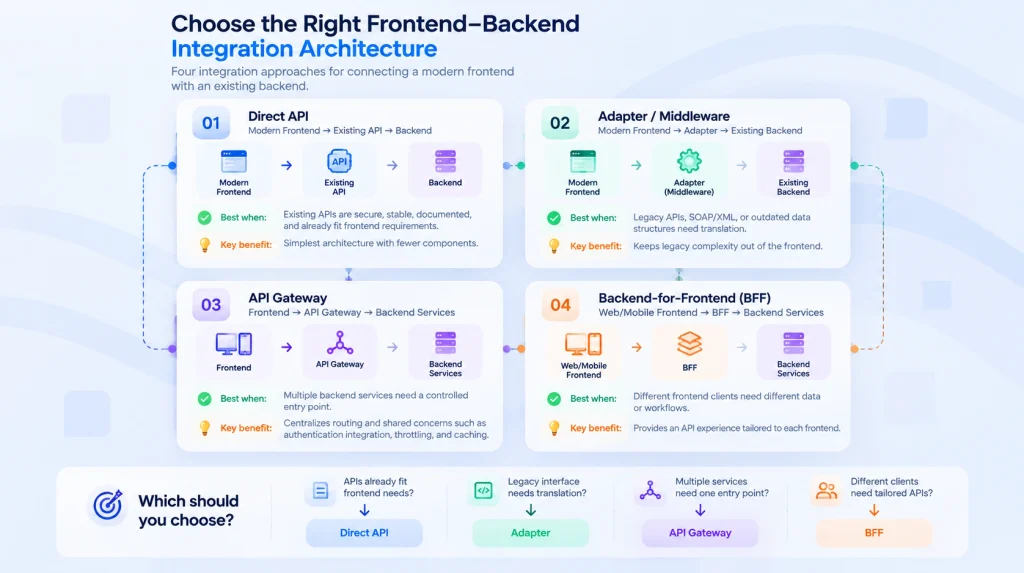
Option 1: Connect the Frontend Directly to Existing APIs
This is the simplest architecture:
Modern Frontend → Existing API → Backend
It works well when the backend already exposes secure, documented, reasonably stable APIs with response formats that fit the frontend.
Advantages include:
- fewer components;
- lower operational complexity;
- less transformation logic;
- faster implementation.
However, direct integration becomes problematic when the frontend starts compensating for poorly designed backend interfaces.
If frontend code is constantly merging responses, translating legacy fields, handling multiple authentication models, or working around inconsistent endpoints, another layer may be justified.
Option 2: Add an Adapter or Middleware Layer
An adapter creates a compatibility boundary:
Modern Frontend → Adapter → Existing Backend
The adapter can:
- convert XML or SOAP responses into JSON;
- rename or restructure legacy fields;
- combine data from several endpoints;
- normalize errors;
- hide backend-specific details;
- translate modern requests into formats the legacy application understands.
This is particularly useful when the backend remains valuable but its interface does not match the needs of modern clients.
The adapter prevents legacy complexity from spreading throughout the frontend.
Option 3: Introduce an API Gateway
An API gateway sits between clients and backend services:
Frontend → API Gateway → Backend services
A gateway can centralize concerns such as routing, authentication integration, throttling, caching, metering, and access to multiple services.
It also creates a boundary that can protect the frontend from internal backend restructuring.
However, a gateway should not become a dumping ground for business logic. If too much orchestration and domain behavior accumulates there, the gateway itself can become difficult to maintain and potentially become a bottleneck.
Option 4: Use a Backend-for-Frontend
A Backend-for-Frontend (BFF) provides an API layer tailored to a particular frontend.
For example:
Web App → Web BFF → Backend Services
Mobile App → Mobile BFF → Backend Services
A BFF can be useful when web and mobile clients have substantially different data, performance, or workflow requirements.
Instead of forcing every client to consume the same generic backend interfaces, each frontend receives an interface optimized for its own use.
A BFF does introduce another component to develop and operate, so it should solve a real client-specific problem rather than being added automatically.
A Simple Decision Framework
Use direct API integration when existing APIs already match frontend requirements.
Use an adapter or middleware layer when legacy protocols or data structures need translation.
Use an API gateway when multiple backend services need a controlled entry point and shared cross-cutting capabilities.
Use a BFF when different frontend clients need materially different API experiences.
Use incremental backend modernization when some backend components must eventually be replaced but a complete rewrite would create excessive risk.
Define the API Contract Before Building Around It
Frontend and backend teams work more effectively when both sides agree on the communication contract.
An API contract should define:
- endpoints;
- request methods;
- required parameters;
- request schemas;
- response schemas;
- status codes;
- authentication requirements;
- validation rules;
- error formats;
- pagination;
- versioning expectations.
OpenAPI can provide a machine-readable description of HTTP APIs, allowing teams and tooling to work from a shared specification.
A contract-first approach also allows frontend developers to build against mocks while backend implementation continues.
For example, instead of simply agreeing that an endpoint returns customer information, define the actual shape:
{
“id”: “cust_1024”,
“name”: “Alex Morgan”,
“email”: “alex@example.com”,
“status”: “active”
}
Both sides now know what the interface promises.
That becomes especially valuable when the backend is being modernized behind the contract. The implementation can change without requiring the frontend to change every time.
REST or GraphQL?
Both can support frontend-backend integration. Neither is automatically the better choice.
REST
REST is often appropriate when:
- resources and operations are straightforward;
- existing REST endpoints already work;
- HTTP semantics fit the application;
- predictable caching behavior is useful;
- The team wants a simpler operational model.
A frontend might request:
GET /api/customers/1024
GET /api/customers/1024/orders
GraphQL
GraphQL may be useful when:
- screens require data from many related resources;
- clients frequently need different subsets of the same data;
- over-fetching or repeated requests create meaningful problems;
- multiple frontend clients have different data requirements.
But adopting GraphQL purely because the frontend is modern can add unnecessary infrastructure.
The architecture should be selected according to actual application requirements, not framework popularity.
Integrating a Modern Frontend With Legacy APIs
Legacy systems often present the hardest integration problem.
The frontend might expect JSON over HTTPS while the backend provides SOAP/XML, proprietary protocols, or interfaces designed for server-side consumers.
Do not force that complexity into every frontend component. A translation layer can create a cleaner boundary:
React / Angular / Vue
↓
Modern API
↓
Adapter / Integration Layer
↓
Legacy SOAP / XML / Existing Services
The modern frontend communicates with a predictable interface. The adapter handles translation into whatever the existing backend requires.
This provides another important benefit: when the legacy implementation is eventually replaced, the frontend-facing contract may remain unchanged.
Standardize Data Transformation
Legacy backend data rarely maps perfectly to modern UI requirements.
For example, an existing system might return:
{
“CUSTOMER_NO”: “1024”,
“CUSTOMER_FULL_NAME”: “Alex Morgan”,
“ACCOUNT_STATE”: “A”
}
The integration layer could expose:
{
“id”: “1024”,
“name”: “Alex Morgan”,
“status”: “active”
}
This translation keeps legacy naming conventions and implementation details out of frontend components.
However, transformation logic should have a clear owner. If the same conversion is repeated throughout the frontend, maintenance becomes difficult.
Handle Authentication and Authorization Carefully
A modern interface should not weaken the security controls of the existing application.
Depending on the architecture, authentication may use:
- server-managed sessions;
- OAuth 2.0;
- OpenID Connect;
- short-lived access tokens;
- secure cookies;
- an identity provider.
The correct approach depends on the application and threat model.
Do not assume that simply storing a JWT in the browser makes an application secure. Browser-based authentication requires decisions about token exposure, session handling, CSRF, XSS, refresh behavior, logout, and authorization.
Sensitive authorization must remain enforced server-side.
The frontend can hide controls that a user cannot access, but hiding a button is not authorization. The backend must independently verify whether the user has permission to perform the operation.
Configure CORS Correctly
CORS becomes relevant when browser code needs to access a resource from a different origin.
For example:
Frontend: https://app.example.com
API: https://api.example.com
The API must explicitly define which origins are allowed to access it through browser cross-origin requests.
CORS is not an authentication mechanism.
A common mistake is treating:
Access-Control-Allow-Origin: *
as a convenient production solution.
Public non-credentialed resources may have legitimate reasons to use a wildcard, but credentialed requests require more restrictive configuration. Production applications should allow only the origins and resources necessary for the application.
Design Consistent Error Handling
Integration failures should not expose raw backend exceptions to users.
Create a predictable error contract.
For example:
{
“code”: “ORDER_NOT_FOUND”,
“message”: “The requested order could not be found.”,
“requestId”: “req_84af21”
}
The frontend can then decide how that error should appear to the user.
Different categories should also be distinguished:
- validation errors;
- authentication failures;
- authorization failures;
- missing resources;
- conflicts;
- rate limits;
- temporary service failures;
- unexpected server errors.
A request or correlation ID can also help engineering teams trace failures across frontend, gateway, adapter, and backend logs.
Plan for Backend Changes Without Breaking the Frontend
A modern frontend becomes difficult to maintain when every backend deployment can unexpectedly break it.
Reduce this risk through:
- documented contracts;
- backward-compatible API changes where practical;
- API versioning when breaking changes are unavoidable;
- contract testing;
- staged deployments;
- feature flags;
- deprecation windows;
- coordinated removal of obsolete fields.
Adding an optional field is usually easier to absorb than suddenly renaming or removing a field already consumed by the frontend.
The API contract should be treated as a product interface rather than an informal implementation detail.
Optimize Performance Across the Boundary
A fast frontend cannot compensate for inefficient communication with the backend.
Measure the entire request path.
Avoid Excessive Requests
A screen that requires 20 sequential API calls may feel slow even if each endpoint is individually fast.
Possible solutions include:
- parallelizing independent requests;
- aggregating related data;
- using a BFF for client-specific aggregation;
- caching suitable responses;
- redesigning overly fragmented endpoints.
Avoid Over-Fetching
Do not transfer large objects when the interface needs only a small subset of data.
This matters particularly for mobile users and applications with large datasets.
Use Pagination for Large Collections
Lists of customers, orders, transactions, or logs should generally not load an entire database resulting in a single response.
Use appropriate:
- pagination;
- filtering;
- sorting;
- search;
- incremental loading.
Cache Deliberately
Caching can reduce repeated backend work and improve responsiveness, but stale data can create correctness problems.
Determine:
- what can be cached;
- where it should be cached;
- how long it remains valid;
- what invalidates it.
Different data requires different caching policies.
Build Observability Into the Integration
A successful integration should be diagnosable in production.
Monitor more than whether servers are running.
Useful signals include:
- request latency;
- API error rates;
- frontend exceptions;
- authentication failures;
- timeout rates;
- dependency failures;
- request volume;
- slow endpoints;
- cache effectiveness.
Where possible, propagate correlation or trace identifiers across layers:
Browser
↓
API Gateway / BFF
↓
Backend service
↓
Database / external service
If a user reports that checkout failed, engineers should be able to follow the relevant request through the system instead of searching disconnected logs manually.
Test Frontend-Backend Integration at Multiple Levels
A modern frontend working against mocked data does not prove that the integrated system works.
Use several testing layers.
Unit Tests
Test individual functions and components in isolation.
API Tests
Verify:
- response schemas;
- status codes;
- authorization;
- validation;
- edge cases;
- error behavior.
Contract Tests
Check whether producers and consumers still satisfy their agreed API contract.
These tests are especially valuable when frontend and backend teams deploy independently.
Integration Tests
Test real interactions between application components.
For example:
Frontend request → API → backend logic → database → response
End-to-End Tests
Validate complete user journeys such as:
Login → search product → add to cart → checkout → confirmation
Tools such as Playwright can combine browser interaction with direct API validation, which can be useful for confirming both user-facing behavior and server-side outcomes.
Migrate Incrementally Instead of Using a Big-Bang Cutover
Replacing the entire interface at once can create unnecessary risk, particularly when the application supports critical business processes.
Instead, migrate in controlled slices.
A practical sequence could be:
- Put a stable API or integration boundary in front of the backend.
- Select one low-risk frontend workflow.
- Build its modern equivalent.
- Route a controlled portion of usage to it.
- Monitor errors, latency, and user behavior.
- Keep a rollback path.
- Resolve integration problems.
- Move the next workflow.
- Retire old frontend components only after the replacement is proven.
For broader application modernization, a similar principle appears in the Strangler Fig pattern: legacy and modern components coexist while functionality is gradually moved to the new implementation.
That avoids tying the success of the entire modernization program to a single high-risk launch.
When the Strangler Pattern Becomes Useful
Suppose a company has:
Legacy Frontend
↓
Legacy Monolith
↓
Legacy Database
The first stage might introduce:
Modern Frontend
↓
API / Gateway
↓
Legacy Monolith
↓
Legacy Database
Later, selected backend capabilities can be extracted:
→ New Customer Service
Modern Frontend → API Gateway → New Order Service
→ Legacy Monolith
Eventually, the monolith may shrink as more responsibilities move elsewhere.
But frontend modernization does not automatically require reaching that final state.
If the backend continues to serve the business effectively, the modernization project may stop after establishing a stable frontend/API boundary.
Plan Deployment and Rollback Before Cutover
Integration planning should include failure recovery before production traffic moves.
Define:
- deployment order;
- database compatibility requirements;
- feature-flag behavior;
- backward compatibility;
- rollback triggers;
- rollback ownership;
- monitoring thresholds;
- data migration procedures.
A deployment is safer when the old and new versions can coexist temporarily.
For example, if the modern frontend depends on a new API field, deploying a backward-compatible backend change before the frontend reduces the chance of a broken intermediate state.
Common Frontend-Backend Integration Mistakes
Rewriting a Stable Backend Without a Business Reason
A new frontend framework does not automatically justify rebuilding years of tested business logic.
Letting the Frontend Talk Directly to the Database
This creates serious security, coupling, and architecture problems. Business data should be accessed through controlled server-side interfaces.
Treating CORS as Security or Authentication
CORS controls browser cross-origin access. Authentication and authorization solve different problems.
Hard-Coding Environment-Specific API URLs
Development, staging, and production environments should have controlled configuration rather than source-code changes for each deployment.
Moving Authorization Into the UI
Disabling or hiding a frontend button does not protect the corresponding backend operation.
Building a Gateway That Becomes Another Monolith
Keep gateway responsibilities focused. Business logic belongs in appropriate application or domain services.
Ignoring Error Contracts
Inconsistent errors force every frontend component to guess how failures should be handled.
Migrating Everything at Once
Large cutovers make failures harder to isolate and rollback.
Optimizing Only the Frontend
A visually modern application can still feel slow if APIs are inefficient or unreliable.
Practical Frontend-Backend Integration Checklist
Before development:
- inventory existing backend interfaces;
- identify critical workflows;
- establish performance and reliability baselines;
- review authentication and authorization;
- map frontend data requirements;
- decide what should remain unchanged.
During architecture:
- choose direct API, adapter, gateway, BFF, or a combination;
- define API contracts;
- decide REST vs GraphQL based on requirements;
- define error formats;
- establish versioning rules;
- design security boundaries.
During implementation:
- isolate API communication from UI components;
- transform legacy data in a controlled layer;
- configure CORS narrowly;
- enforce authorization server-side;
- handle loading, timeout, and failure states;
- optimize payloads and request patterns.
Before release:
- run API and integration tests;
- run critical end-to-end journeys;
- test authentication and permissions;
- load-test important endpoints where appropriate;
- validate monitoring and logging;
- define rollback conditions;
- test the rollback procedure.
After release:
- monitor latency and errors;
- review frontend exceptions;
- compare performance with the baseline;
- investigate failed user journeys;
- retire old components only when the replacement is stable.
How We Approaches Frontend Integration With Existing Systems
The right modernization strategy depends on the condition of the application rather than the age of its technology alone.
A project may require a new frontend while preserving most of the existing backend. Another may need an adapter around legacy services, while a more complex environment may benefit from an API gateway, a client-specific BFF, or gradual backend modernization.
At DevVerx, our approach combines frontend development services for modernizing the user-facing experience with backend development services for APIs, integrations, server-side architecture, and supporting systems when backend changes are needed.
For applications where older architecture itself has become a constraint, legacy software modernization can extend the project beyond the frontend and address the components that genuinely need replacement or restructuring.
The objective should be to modernize what creates value while preserving stable systems when replacing them would add cost and risk without a clear benefit.
Frequently Asked Questions
Can a modern frontend work with a legacy backend?
Yes. A modern frontend can often work with an existing backend if the backend exposes a usable interface or can be placed behind an API, adapter, middleware layer, gateway, or BFF. The backend does not necessarily need to be rewritten.
Do I need to rebuild my backend when moving to React, Angular, or Vue?
No. The frontend framework and backend implementation can usually evolve independently when they communicate through a stable interface. Backend changes are necessary only when existing capabilities cannot safely or effectively support the new application requirements.
What is the best way to connect a frontend to an existing backend?
There is no universal architecture. Direct API integration is simplest when existing APIs are suitable. Adapters are useful for legacy interfaces, gateways help manage access to multiple services, and BFFs can serve client-specific requirements.
Should I use REST or GraphQL for frontend-backend integration?
Use the approach that fits the application’s requirements and existing architecture. REST is often simpler for resource-oriented interfaces, while GraphQL can help clients that need flexible access to interconnected data. Neither should be selected solely because it is more modern.
What if the existing backend uses SOAP or XML?
A middleware or adapter layer can expose a modern HTTP/JSON interface to the frontend while translating requests and responses to the existing SOAP/XML services behind the scenes.
What is the difference between an API gateway and a BFF?
An API gateway commonly provides a controlled entry point to backend services and can handle shared concerns such as routing, authentication integration, throttling, and caching. A BFF is designed around the needs of a particular frontend client, such as a web or mobile application.
Is CORS the same as API authentication?
No. CORS determines whether browser-based code from one origin can access resources from another origin. Authentication establishes identity, while authorization determines what an authenticated identity can access.
How can frontend modernization be deployed without disrupting users?
Use incremental releases, backward-compatible APIs, feature flags where appropriate, monitoring, and a tested rollback path. Critical workflows can be migrated individually rather than replacing the entire frontend in one deployment.
Final Thoughts
Integrating a modern frontend with an existing backend is primarily an architecture and risk-management problem, not simply a matter of sending API requests.
Start by determining what already works.If the backend remains reliable, preserve it. Create a stable API boundary and modernize the user-facing layer around it. If legacy interfaces create friction, introduce an adapter or gateway. If different clients require different data experiences, evaluate a BFF. If parts of the backend genuinely prevent the application from evolving, modernize those components incrementally.
The strongest architecture is not necessarily the one that replaces the most technology.
It is the one that gives the frontend room to evolve while keeping data, business logic, security, and operations reliable.
