
The best tech stack for SaaS is not a fixed list of trendy tools. It is the mix of languages, frameworks, databases, cloud services, and security controls that fits your product, team, users, and budget. A simple scheduling SaaS app needs a different setup from a healthcare platform or a real-time analytics product.
For many teams building web applications, a practical starting point is React or Next.js with TypeScript, Node.js or Python for the backend, PostgreSQL for core data, and managed cloud hosting. But that is only a starting point, not a one-size-fits-all solution. Enterprise systems may benefit from .NET or Java, AI products may need Python and mobile-first products may use Flutter or React Native.
This guide explains how to choose the best tech stack for a SaaS application, compares real options, and shows what to test before you commit. It also covers multi-tenancy, SaaS integrations, QA testing, security, and long-term operating costs.
What Is a SaaS Technology Stack?
A technology stack for SaaS application development is the set of tools used to build, deploy, operate, and improve a subscription-based software product. SaaS applications are usually accessed through browsers or mobile clients while core services run on cloud infrastructure. A stack supports the complete product, not just its interface.
| Layer | What it does | Common choices |
| Front-end | Builds screens, forms, dashboards and user flows | React, Next.js, Vue, Nuxt, Angular, SvelteKit |
| Back-end | Runs business rules, authentication and APIs | Node.js/NestJS, Django, FastAPI, ASP.NET Core, Spring Boot, Laravel, Rails, Go |
| Database | Stores customers, permissions, billing and product data | PostgreSQL, MySQL, SQL Server, MongoDB |
| Cloud and operations | Hosts workloads, storage, jobs and monitoring | AWS, Azure, Google Cloud, managed platforms |
| Supporting services | Adds payments, messaging, search and analytics | Stripe, queues, Redis, observability tools |
The goal of SaaS application development is to make these layers work as reliable end-to-end applications. The choice also affects hiring, future upgrades, security, and SaaS software development costs.
What Makes a Stack the Right Choice?
Start with product requirements, not a framework ranking. A stack that provides better performance in one benchmark may not be the best suited for applications with complex business rules, a small team, or strict customer data requirements.
-
- Write down the must-have product workflows: signup, roles, billing, reporting, notifications and integrations.
-
- Describe the target users: small teams, enterprises, consumers, or regulated organizations.
-
- Estimate realistic usage: concurrent users, data volume, peak traffic and the load of requests.
-
- List non-negotiable requirements: latency, uptime objectives, data residency, audit logs and applicable compliance regulations.
-
- Review the team’s skills, available dedicated developers, hiring market and support needs.
-
- Compare build speed, ongoing operations, vendor lock-in, migration cost and total cost of ownership.
-
- Prototype the riskiest workflow and measure it before choosing the final stack.
The strongest choice is often the technology your team can operate well. A product can handle high traffic through good database design, caching, load balancing and careful measurement, not simply because it uses a fashionable SaaS programming language.
Best Front-End Technologies for SaaS Web Development
For SaaS web development, the front-end must be accessible, responsive and easy to maintain. ReactJS is popular among SaaS software developers because it offers reusable UI components and a broad ecosystem. Next.js adds routing and rendering tools, but teams must understand its deployment and caching model.
| Technology | Best fit | Trade-off |
| React + Next.js | Interactive dashboards and full-stack TypeScript teams | Many architecture choices framework upgrades need care |
| Vue + Nuxt | Teams seeking an approachable component model | Different ecosystem and hiring conditions by region |
| Angular | Large teams wanting conventions and integrated tooling | More structure and learning overhead |
| Svelte + SvelteKit | Lean, reactive web interfaces | Smaller ecosystem for some specialist needs |
JavaScript remains a core programming language for SaaS development because it runs in the browser and, with Node.js, on the server. Its flexibility and ease of use make it a perfect match for web development projects that need interactive front-end, back-end and API layers. TypeScript adds static checks that help teams catch many errors earlier.
That does not mean JavaScript code is always easy to read and understand, or that debugging JS code is very straightforward. Readability depends on architecture, tests and developer practices. The large community of JS developers can offer support when needed, but third-party libraries still require security and maintenance review. These factors make JS an appealing choice for enterprises and startups when the team has relevant skills.
When using Javascript in a SaaS product, pick each toolkit or library for a clear need. Avoid adding a package simply because it is popular.
Best Back-End Languages and Frameworks for SaaS Applications
The back-end handles authentication/authorization, business logic, billing events, data access, scheduled work and SaaS integrations. The top programming languages and best frameworks for SaaS applications depend on the work the product must perform.
| Language / framework | Strong use case | Main consideration |
| TypeScript / Node.js / NestJS | API-driven products and shared language across teams | CPU-heavy work often belongs in separate workers |
| Python / Django | Fast delivery of data-heavy business applications | Plan async and background processing carefully |
| Python / FastAPI | APIs and machine learning algorithms or AI-powered analytics | More supporting components may be needed |
| C# / ASP.NET Core (.NET) | Enterprise workflows and Microsoft integrations | Requires relevant C# and cloud expertise |
| Java / Spring Boot | Complex enterprise back-end systems | Setup and operational footprint vary |
| PHP / Laravel | Business applications and rapid CRUD development | Maintain clear module boundaries |
| Ruby / Rails | Fast development with strong conventions | Evaluate hiring and long-term support |
| Go | High-throughput services and efficient workers | Less built-in application scaffolding |
Why Consider .NET for Enterprise SaaS?
.NET is one of the best frameworks for SaaS applications in scenarios where C#, mature tooling, Microsoft products, and enterprise identity integration are important. More precisely, ASP.NET Core is the web framework in the .NET ecosystem. It offers an impressive range of features and capabilities, including support for HTTP services, dependency injection, background tasks and production diagnostics.
Teams can use data stores such as Azure Tables and NoSQL databases through supported libraries and services. .NET also offers powerful tools for building asynchronous microservices architectures, though microservices are not required for every SaaS product. There are open-source libraries available for .NET development services, and developers worldwide contribute packages and documentation.
A significant advantage of using .NET for SaaS web development is integration with platforms and technologies such as Microsoft products, Microsoft Entra ID (formerly Azure Active Directory), and SQL Server. These tools can reduce integration effort for Microsoft-centered customers, but they do not remove the need for design, testing or configuration.
When Is JavaScript the Better Choice?
A programming language for SaaS development is JavaScript when browser-heavy workflows, a unified TypeScript team and a rich web ecosystem matter most. JavaScript an ideal choice for building SaaS applications is an awkward phrase in practice, JavaScript can be an ideal choice for many SaaS applications because of its well-rounded feature set and available third-party components and services.
No stack means teams never need to write any code from scratch. Existing packages reduce routine work, while unique product logic still requires careful engineering.
Which Database Should You Choose?
PostgreSQL is a sensible default for many SaaS platforms because subscriptions, organizations, users and permissions have strong relationships. MySQL and SQL Server are also capable relational options. MongoDB can be useful when document-shaped data is central to the product do not assume that NoSQL automatically scales better or that SQL prevents fast iteration.
Redis is commonly used for caching and short-lived state, not as a direct replacement for the primary transactional database. Search indexes and analytics warehouses should be added when product needs justify them.
Multi-Tenant Database Architecture Pool, Bridge, and Dedicated Models
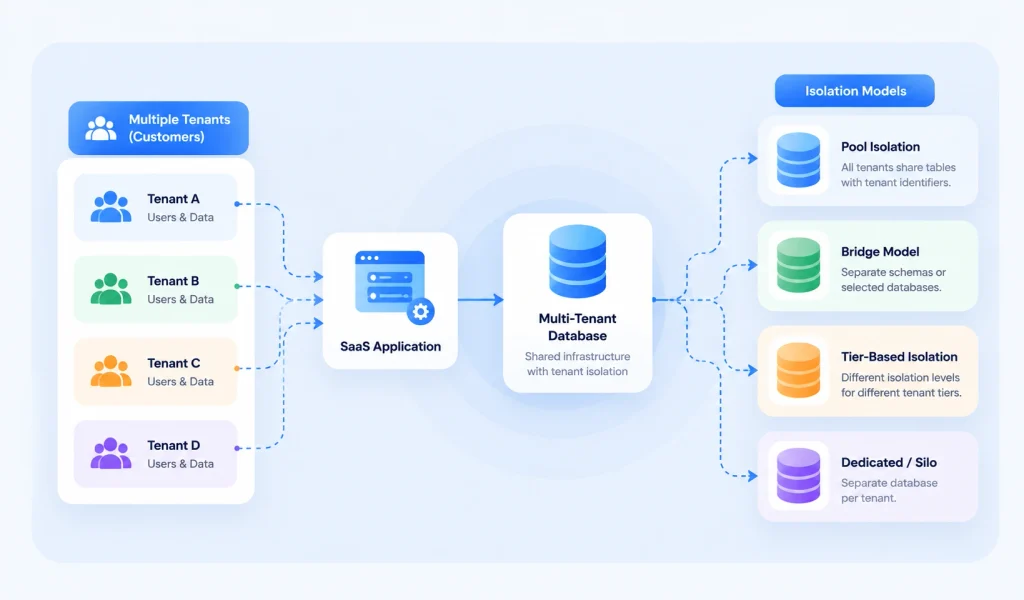
A Multi-tenant database serves multiple tenants, usually customer organizations, within a product. Multi-tenant database architecture must ensure that users can access only their own data. A tenant is not the same as a user, one tenant may have many users.
| Isolation model | How it works | Best fit and caution |
| Pool isolation | Multiple tenants share tables, usually with tenant identifiers and enforced policies | Cost-efficient for a large number of tenants requires strong access controls |
| Bridge model | Tenants share some infrastructure but use separate schemas or selected databases | Flexible middle ground adds migration and operational work |
| Tier-based isolation | Different customer tiers receive different isolation levels | Useful when premium or regulated tenants need stronger separation |
| Dedicated / silo | Separate database or infrastructure per tenant | Clearer boundaries but higher operating overhead |
Some products also serve single tenants through a dedicated deployment. Neither shared nor dedicated hosting automatically guarantees isolation. The right design depends on threat modeling, cost, customer contracts and data residency.
For pooled PostgreSQL, tenant-aware queries and row-level security can help, but developers must test policy bypass, background jobs, connection pooling and privileged database roles. A pooled model may offer cost efficiency, while dedicated setups may provide better performance isolation for noisy workloads. Each option can bring complex configuration and maintenance.
Cloud Infrastructure AWS, Azure, Google Cloud, or Managed Hosting?
Large cloud service providers include Amazon Web Services and Microsoft Azure, as well as Google Cloud. These cloud providers offer managed databases, storage, networking, logging, backups and deployment tools. Cloud-based SaaS applications may also run on smaller managed platforms when the workload is simpler.
| Option | When to consider it | What to watch |
| AWS | Broad managed services and global deployment choices | Cost governance and architecture complexity |
| Microsoft Azure | Enterprise Microsoft identity and data integrations | Service configuration and cloud spending |
| Google Cloud | Data processing, analytics and managed cloud services | Service fit and team familiarity |
| Managed app platforms | Small teams seeking faster deployment | Limits, pricing changes and portability |
Experienced cloud developers should test regional availability, data transfer fees, recovery targets, database backups and incident response. The right cloud service does not automatically guarantee data security, uptime or compliance.
SaaS Integrations APIs, Connectors, and iPaaS
A major challenge for SaaS developers is that different companies use different software. A SaaS application must often integrate third-party applications and services such as CRM tools, accounting systems, email providers and payment gateways.
Application Programming Interfaces (APIs) let software exchange data or trigger actions. API solutions allow SaaS software developers to create custom code for specific workflows. Pre-built connectors or adapters can reduce setup work when supported by the target systems. Integration Platform as a Service (IPAAS), commonly written iPaaS, provides managed tools for connecting applications, mapping data and running workflows.
When comparing IPAAS providers, check connector coverage, rate limits, error handling, audit logs, data residency and price. Commercial connectors can save time, but complex workflows may still require technical expertise. Decide whether to integrate your SaaS applications through direct APIs, webhooks, iPaaS or a combination based on expected volume and ownership needs.
-
- Use idempotency keys and retries for billing and other important events.
-
- Keep secrets in a managed secret store rather than source code.
-
- Version public APIs and document breaking changes.
-
- Test failure paths: expired tokens, rate limits, duplicate webhooks and third-party outages.
Security and Compliance Must Shape the Stack
There are no blanket Guarantees of data security from a programming language, framework or hosting company. A credible SaaS security plan combines design, secure implementation, operations and independent checks. It is misleading to promise that customer data is safe and secure simply because a platform uses cloud hosting.
Start with authentication/authorization, least-privilege access, tenant isolation, proper data storage, encrypted transport, tested backups, and audit logging. Use modern authenticated encryption such as AES-GCM when appropriate. Although AES or 3DES appears in some legacy discussions, 3DES is not a suitable default for new systems. Store passwords using a dedicated password-hashing algorithm, not reversible encryption. Protect passwords, tokens, or biometric authentication workflows with standards-based controls and careful key management.
Security solutions may include intrusion detection systems (IDS), firewalls, endpoint protection or antivirus software, and automated dependency scanning. These controls can help protect data against accidental or malicious breaches, but no single control is sufficient. Keep software up-to-date, cloud providers may offer automatic update features for managed services, while the application team remains responsible for its own code and configurations.
For GDPR, applicability is not limited to businesses located in the European Union, certain organizations outside the EU can also fall within scope when offering goods or services to people in the EU or monitoring their behavior. UK GDPR and the Data Protection Act 2018 may also apply to UK operations. In the usa, companies that target the US market need to comply with HIPAA only when their activities and data handling fall within HIPAA’s scope, it does not apply to every US SaaS product. Review applicable compliance regulations with qualified advisers rather than assuming a cloud vendor makes an application compliant.
QA Testing, Reliability, and Performance
QA testing should cover unit tests, integration tests, end-to-end user flows, accessibility, security, load testing and disaster recovery. Test the real business path, customer signup, subscription payment, role changes, data export and account cancellation.
To handle high traffic, identify bottlenecks with measurements. A system facing a large load of requests may need database indexes, connection pooling, caching, queues, rate limiting, autoscaling and background workers. Performance depends on the whole design, not only the backend language.
-
- Set measurable service objectives, such as API latency and error-rate targets.
-
- Run realistic load tests with representative tenant sizes and data volumes.
-
- Test backup restoration, not just backup creation.
-
- Monitor application errors, infrastructure health and billing events.
-
- Run security reviews before launch and after major changes.
Recommended SaaS Tech Stacks by Product Type
| Product scenario | Practical starting stack | Why it may fit |
| Lean B2B MVP | Next.js + TypeScript + PostgreSQL + managed hosting | Shared language, quick iteration and relational data |
| Operations / admin SaaS | Django + PostgreSQL + React or Vue | Strong business logic and admin workflows |
| Microsoft-centered enterprise | Angular or React + ASP.NET Core + SQL Server + Azure | Identity and Microsoft ecosystem integration |
| AI-enabled product | React/Next.js + FastAPI + PostgreSQL + managed AI services | Python data and model integration |
| Real-time collaboration | React + Node.js/NestJS + PostgreSQL + Redis + messaging | Event-driven features and persistent connections |
| API-first platform | React + Go or FastAPI + PostgreSQL + managed cloud | Service boundaries and documented APIs |
| Mobile-first SaaS | Flutter or React Native + API backend + PostgreSQL | Cross-platform mobile clients |
These are reference architectures, not rankings. A team experienced in Laravel, Rails or Java can build excellent SaaS software solutions without switching to TypeScript or Python. A modular monolith is often easier to ship and maintain than premature microservices.
How to Choose the Best Tech Stack for SaaS Step by Step
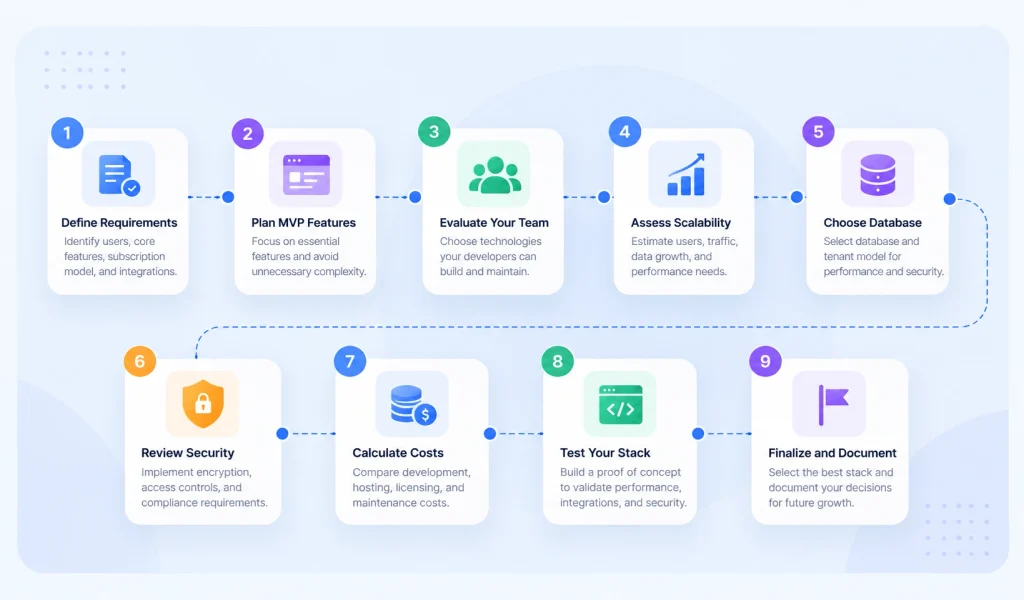
Choosing the best tech stack for SaaS requires evaluating your product features, development resources, security requirements, and scalability needs. The right technology stack for SaaS application development should support reliable performance, smooth integrations, and long-term growth.
1. Define Your SaaS Application Requirements
Identify your target users, core features, subscription model, and required SaaS integrations. For example, accounting SaaS applications need accurate financial records, while collaboration platforms may require real-time communication and scalable back-end systems.
2. Identify Your MVP Features
Start with essential features such as authentication, subscriptions, dashboards, and primary workflows. A focused MVP helps SaaS software developers launch faster without adding unnecessary complexity. However, security and tenant isolation should be planned from the beginning.
3. Evaluate Your Development Team
Choose a SaaS programming language and frameworks your developers can confidently use and maintain. JavaScript, Python, and .NET are common choices for SaaS software development. Experienced teams or dedicated developers can help businesses select technologies based on actual project requirements.
4. Assess Performance and Scalability
Estimate concurrent users, API requests, database growth, and background processing needs. Cloud-based SaaS applications should be designed to handle high traffic and an increasing load of requests through caching, load balancing, optimized queries, and scalable infrastructure.
5. Choose Your Database and Tenant Model
Select a database based on data structure, performance, and security requirements. A multi-tenant database architecture may use shared resources through Pool isolation, separate resources, or a Bridge model that combines shared and dedicated components.
For applications serving multiple tenants, strong access controls are essential. The PostgreSQL row-level security documentation explains how database policies can help restrict record access.
6. Review Security and Compliance
Evaluate authentication/authorization, encryption, proper data storage, and access controls. Depending on the product’s activities and customers, GDPR, HIPAA, or other applicable compliance regulations may affect hosting, security, and data management decisions.
The OWASP Application Security Verification Standard provides useful security requirements for web applications.
7. Calculate Total Development Costs
Compare development expenses, cloud hosting, database services, software licenses, QA testing, and ongoing maintenance. Large cloud service providers, including Amazon Web Services and Microsoft Azure, offer different pricing models and managed services. Choose according to your application’s requirements and expected usage.
8. Test Your Technology Stack
Build a Proof of Concept (PoC) to evaluate critical features before full SaaS application development. Test API integrations, database performance, security controls, and scalability under realistic conditions to identify technical limitations early.
9. Finalize Your SaaS Tech Stack
Select the combination of platforms and technologies that best supports your product requirements, development team, and budget. Document your decisions to simplify future upgrades, maintenance, and application scaling.
SaaS Technology Stack Decision Framework
There is no one-size-fits-all solution for selecting the best tech stack for a SaaS application. A weighted comparison helps businesses evaluate available technologies based on their technical and operational priorities.
| Decision Factor | Weight | What to Evaluate |
|---|---|---|
| Product fit | 25% | SaaS features and integrations |
| Team expertise | 20% | Programming skills and frameworks |
| Security | 20% | Authentication, encryption, compliance |
| Maintainability | 15% | Updates, documentation, support |
| Scalability | 10% | Performance and cloud infrastructure |
| Total cost | 10% | Development, hosting, maintenance |
| Total | 100% |
SaaS Tech Stack Comparison Example
The following example compares two hypothetical SaaS technology stacks using scores from 1 to 5.
| Criteria | Stack A | Stack B |
|---|---|---|
| Product fit | 4/5 | 5/5 |
| Team expertise | 5/5 | 3/5 |
| Security | 4/5 | 5/5 |
| Maintainability | 4/5 | 4/5 |
| Scalability | 4/5 | 5/5 |
| Total cost | 4/5 | 3/5 |
| Weighted Score | 84/100 | 85/100 |
Stack B scores slightly higher, but Stack A may be more suitable for teams prioritizing technical familiarity and development costs. The final choice should reflect the application’s requirements rather than its overall score alone.
These are illustrative scores, not independently verified technology benchmarks. Businesses should validate their decisions through technical testing and project-specific evaluations.
Common Mistakes to Avoid
-
- Choosing a framework because it is popular instead of because it meets product needs.
-
- Treating multi-tenant isolation as a simple tenant_id filter without threat modeling or tests.
-
- Assuming serverless means unlimited scale or zero idle costs in every service.
-
- Starting with microservices before the team has a clear need for them.
-
- Ignoring cloud bills, logging, backups, observability and on-call work.
-
- Building custom authentication or billing logic without a compelling reason.
-
- Claiming GDPR or HIPAA compliance based on a vendor logo alone.
-
- Planning a complete rewrite rather than measuring and replacing real bottlenecks.
When Should You Work with a SaaS Development Partner?
A SaaS application development company can help when a founder lacks an in-house architecture lead, needs an independent security review, or must connect complex back-end systems. Useful services include Consulting, discovery workshops, architecture reviews, product design, dedicated developers, cloud engineering and QA testing.
At DevVerx, our SaaS software development approach can begin with requirements, a technical roadmap and a proof of concept. We help companies transform their business by aligning software decisions with actual workflows and customer needs. Claims that a particular project helped businesses achieve their goals should be supported by verified outcomes in Our case studies before publication. Do not treat that phrase as evidence without an approved case study.
The right partner should explain trade-offs, review third-party components and services, and show how its security solutions and delivery process meet your needs. Look for clear scope, documentation, realistic milestones and ownership of the finished product.
Frequently Asked Questions
What is the best tech stack for SaaS startups?
For many startups, Next.js or React with TypeScript, a familiar backend framework, PostgreSQL and managed hosting is a practical starting point. The best choice depends on your team and product requirements.
Is React or Angular better for a SaaS app?
React suits teams that want flexible component-based development. Angular suits teams that prefer a more opinionated framework and consistent conventions. Both can support complex SaaS applications.
Which backend is best for SaaS software development?
Node.js, Django, FastAPI, ASP.NET Core, Laravel, Rails and Spring Boot can all work well. Choose based on team expertise, business logic, integrations and operating requirements.
Should a SaaS use a multi-tenant database?
Not always. Pooled databases can reduce operating cost for many customers, while dedicated databases may better match certain isolation or contract requirements. The correct model follows customer and security needs.
Is AWS or Azure better for SaaS platforms?
Both are capable. AWS offers a broad range of services, while Azure may be convenient for Microsoft-centered customers. Compare region, identity, managed services, costs and team skills.
How do SaaS products integrate with other tools?
They commonly use APIs, webhooks, pre-built connectors or iPaaS platforms. The right approach depends on integration complexity, security, volume and reliability requirements.
Can I change my SaaS tech stack later?
Yes. Well-defined modules and interfaces make it easier to replace individual services or databases. A full rewrite is often avoidable and should be based on evidence, not trends.
What security requirements should SaaS founders plan for?
Plan for identity, access control, tenant isolation, encryption, secure development, monitoring, backups and applicable legal requirements from the start. No stack guarantees compliance or protection by itself.
Final Thoughts
The best tech stack for SaaS is the one that helps your team deliver a secure, useful product now while keeping future changes manageable. Start with product needs, compare proven tools, test your riskiest assumptions, and keep the architecture as simple as practical. For DevVerx readers planning a new SaaS product, the next step is an architecture review that turns business requirements into a tested technical plan.
